
In today's competitive business environment, the shift towards modernizing ERP systems with S/4HANA migration is gaining momentum. SAP S/4 HANA offers organizations a means to cut down on operational IT costs by simplifying their IT setups. This evolution promises advanced analytics, simplified processes, improved agility, and enhanced efficiency. However, legacy data migration complexities often lead to cumbersome processes and reliance on third-party solutions.
Each organization has unique requirements. Therefore, organizations must implement a tailored data migration strategy and choose appropriate tools to accelerate their transition to SAP S/4 HANA effectively. The process of transferring data into SAP S/4 HANA can be daunting, underscoring the necessity for a proven data migration method.
In this post, we'll cover the best methods and tools for data migration to SAP S/4HANA ensuring a smooth transition. Let's get started!
Business Requirement:
Business Benefits:
Here are the SAP Data Migration tools & methods for implementing S/4HANA software into your business processes:
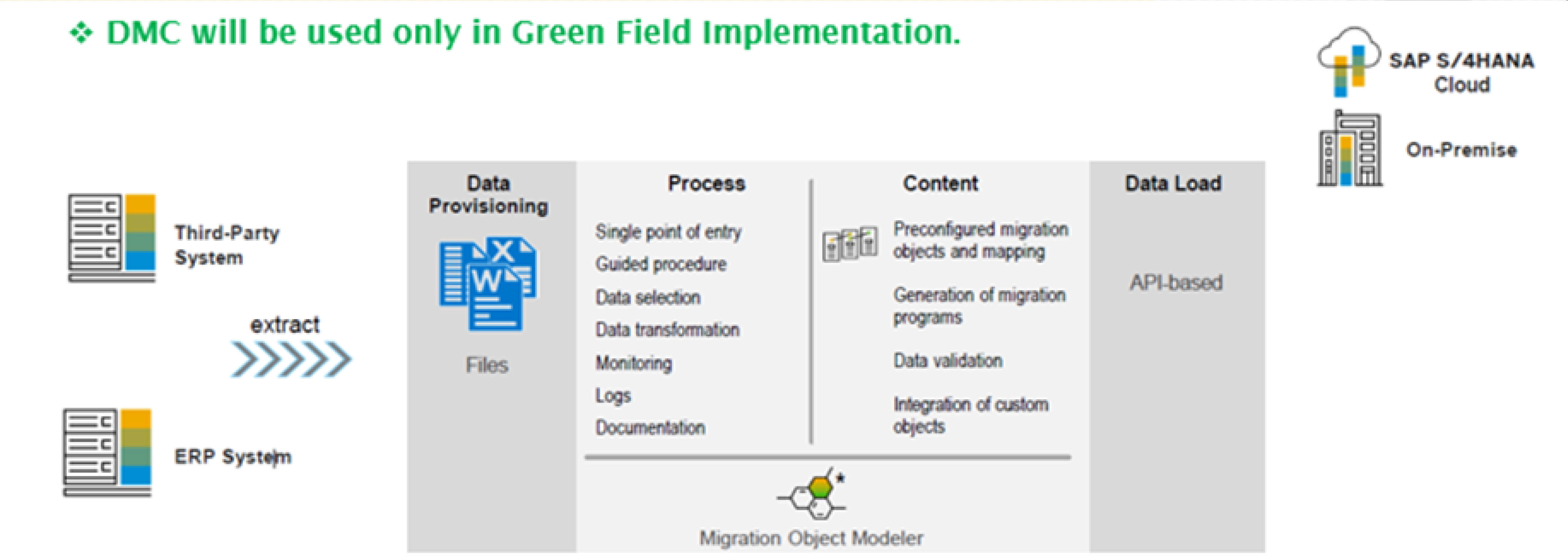
The SAP S/4HANA Data Migration Cockpit (DMC) is a data migration tool provided by SAP to streamline data migration from legacy systems to SAP S/4HANA. With its user-friendly graphical interface, the DMC allows easy definition, execution, and monitoring of data migration activities. Leveraging SAP's preset migration objects, this tool facilitates data mapping and migration. It offers features including data mapping, field transformation, data validation, and error handling. The DMC aims to reduce manual effort, ensure data integrity, and minimize risks associated with data migration projects, providing a seamless process post-S/4HANA installation.
SDS is a robust enterprise-level data integration and ETL tool crafted to enhance data migration efficiency and ensure data quality. It functions through distinct extraction, transformation, validation, and loading stages. SDS enables the extraction of data from diverse sources, standardizes it for the target system, validates data quality, and ultimately loads the information into target systems or flat files.
SDI serves as an Extract, Transform, Load (ETL) tool, facilitating the extraction of data from multiple source systems into S/4HANA. It offers the capability to access and transform data from both on-premise and cloud environments, enabling real-time data loading through its prebuilt adapters. Its intuitive graphical interface empowers users to design data integration workflows and efficiently manage data pipelines.
The BDOS system serves as an ETL (Extract, Transform, Load) tool designed for extracting, transforming, and loading data from source systems to target systems. BDOS efficiently extracts data, transforms it into valuable insights, and loads it into diverse systems. With its tight integration into SAP systems, BDOS emerges as an excellent tool for effortless data migration from legacy systems to SAP systems, requiring minimal development efforts. Moreover, it offers effective debugging and monitoring capabilities, further enhancing its utility and efficiency.
BDC is a method for data migration within SAP that utilizes the batch input program. It offers two execution approaches: the call transaction method and the session method. This technique streamlines the transfer of large data sets from legacy systems to SAP systems by automating what would otherwise be a manual process. Initially, it transfers data related to individual transactions in a correct format. Then, it automatically processes all remaining data entries that follow the same format. This background process transfers data one by one, mimicking manual entry. Notably, BDC only moves data from legacy systems to SAP systems, not vice versa.
The Legacy System Migration Workbench (LSMW) is a data migration tool that facilitates the transfer of data from legacy systems to SAP systems. It offers a user-friendly mapping tool with helpful features, providing a structured approach for defining and executing data migration projects. With LSMW, you can define data migration objects, map fields between legacy and target systems, and execute batch data uploads seamlessly.
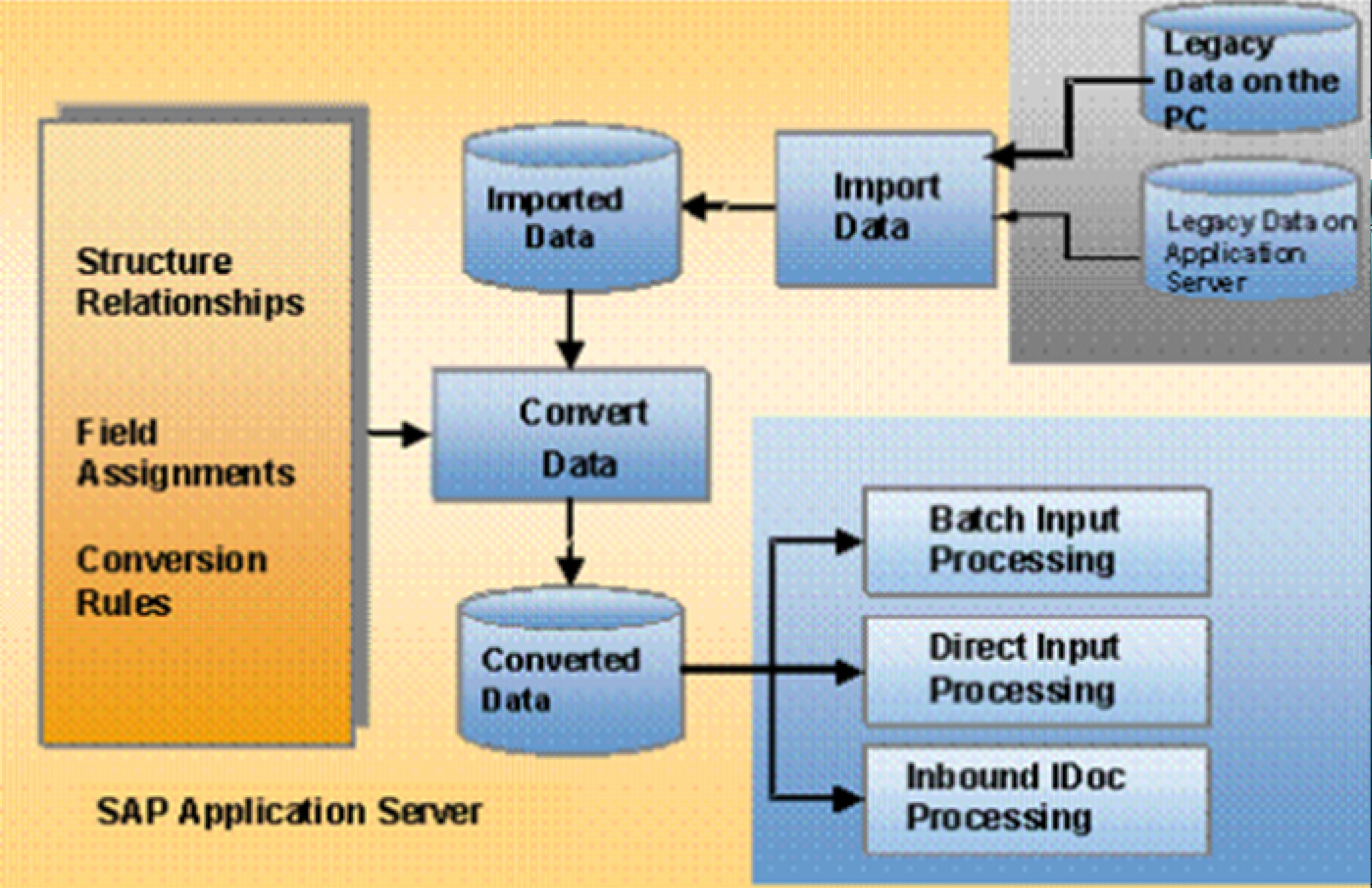
The Legacy System Migration Workbench (LSMW) is a data migration tool designed to support the transfer of data from non-SAP Legacy Systems to SAP R/3 systems. Whether it's a One-time transfer or a recurring task, LSMW provides versatile options for converting legacy system data. This user-friendly tool streamlines the process by offering a structured approach to define and execute data migration projects. With LSMW, users can easily define data migration objects, map fields between legacy and target systems, and execute batch data uploads efficiently.
These are some of the tools provided for data migration within SAP S/4HANA. Interested in how to select the appropriate tool? The decision on tools relies on factors like the migration's complexity, data volume, source systems, and specific project needs.
Consider these essential best practices when selecting the optimal data migration approach for S/4HANA:
Assess Data Volume: Determine the amount of data, including configuration, master, and historical data, to migrate. Historical data is critical for S/4HANA's accuracy and predictive capabilities, impacting memory requirements and costs.
Plan for the Future: Anticipate your future needs with S/4HANA to avoid rigid systems that may hinder scalability. Long-term planning ensures your migration aligns with evolving business requirements.
Set Migration Goals: Establish clear goals and timelines for data migration, considering the complexity and size of your organization. SAP's prebuilt templates can expedite certain processes, but setting realistic completion timelines is essential for success.
Assess Processes for Improvement: Evaluate which processes to modify and which to preserve based on their impact and relevance to your business. Standard S/4HANA processes may suffice for some areas, while others may require customization to avoid disruptions.
By following these practices, you can streamline your data migration to S/4HANA and maximize the benefits of your ERP integration. Analyzing the data migration requirements or consulting with SAP experts can help determine the most suitable tools and methodologies for a successful transition to SAP S/4HANA.
Selecting the optimal data migration approach, leveraging prebuilt templates or customizing solutions, and the right tools and methodologies, aligned with specific project needs, are key to a successful migration journey. Consulting with SAP experts can further guide organizations in making informed decisions for a successful transition to SAP S/4HANA.
As businesses embark on this journey from legacy systems to innovation, the tools and strategies discussed here pave the way for a streamlined, efficient, and future-ready data migration to SAP S/4HANA.